
Discover our October System Updates
We are excited to share our recent advancements, featuring system updates, tips, and seasonal highlights.
We are enthusiastic about the potential these updates offer and the new heights we can reach together. Thank you for your trust in us. We look forward to another month of mutual progress and collaboration.
Highlighting Payment Page Advancements
The payment page has been significantly enhanced to provide greater flexibility, accuracy, and control over the payment process. Users can now apply payments to specific sales balances, with the total payment amount automatically calculated based on the transactions selected. These improvements streamline payment processing, reduce manual calculations, and deliver a more efficient and reliable user experience.

The Advanced Payment page offers flexible and efficient payment processing options designed to accommodate various business needs.
Linking Payment to Specific Transactions
Use the Link button to apply a payment to a specific transaction and cover its full outstanding balance. If any payment credit remains, click the Link button again to apply it to additional transaction balances
The Aging field displays the age of each invoice, helping to identify older outstanding invoices and determine which invoices to prioritize for payment.
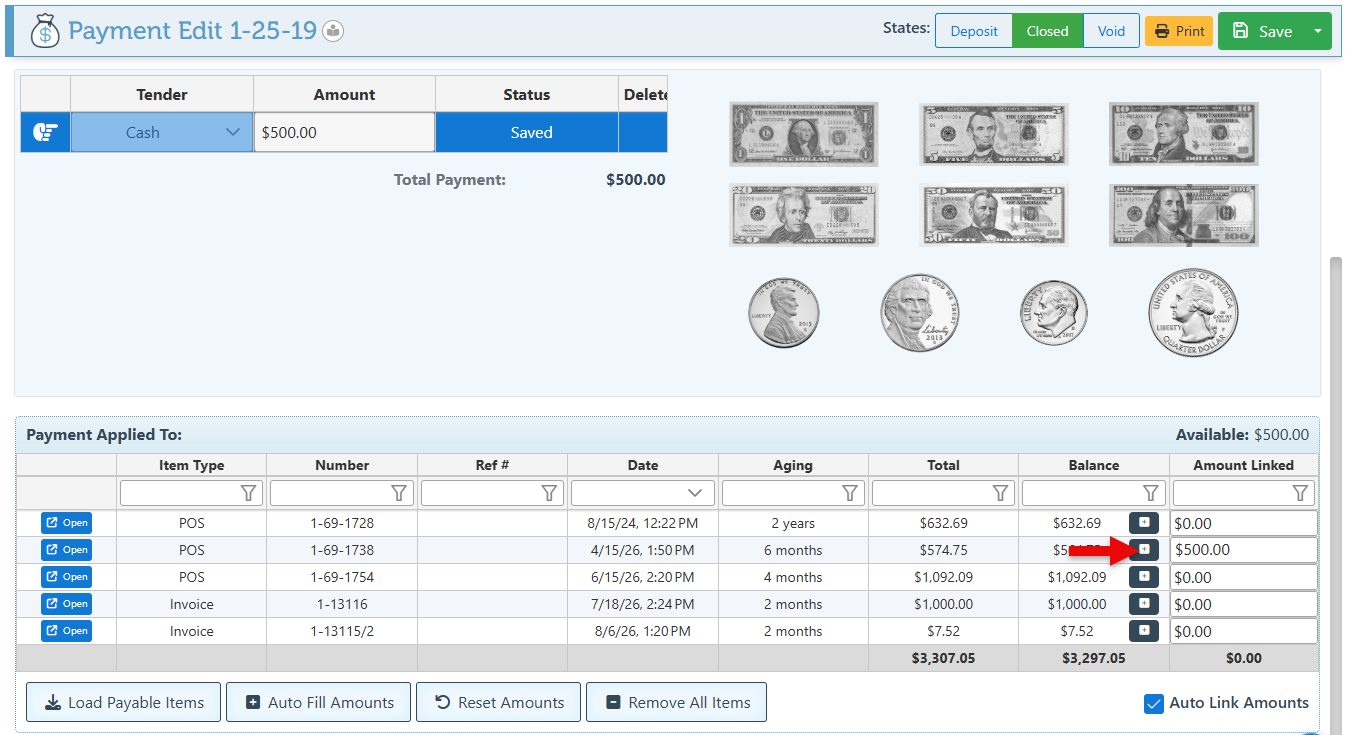
Distribute Payment across Multiple Transactions
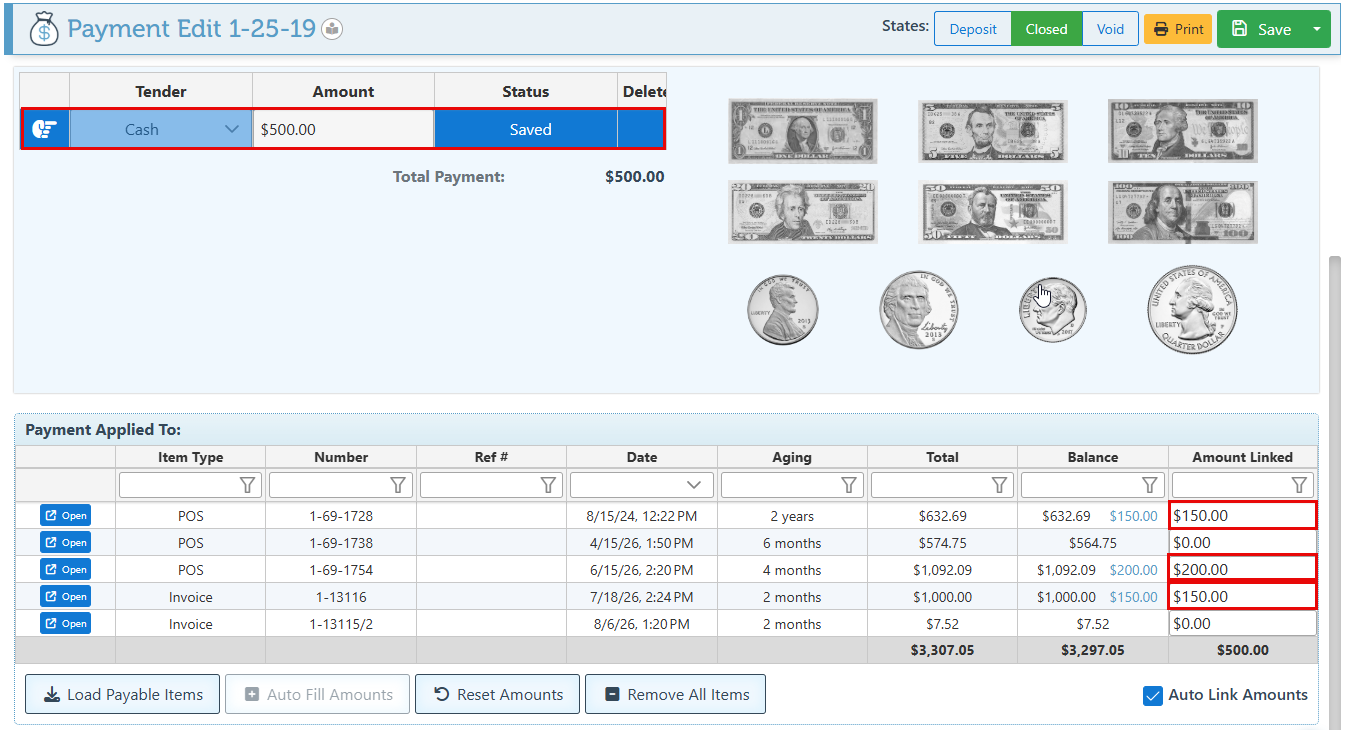
UDistribute Payment across Multiple Transactions
The Amount Linked field can be used to distribute a payment across multiple sales transactions, including applying partial payments where necessary.
For each transaction receiving a payment, enter the amount to be applied in the Link Amount field.This option provides flexibility when a single payment needs to cover several invoices or when only part of an invoice balance is being paid.
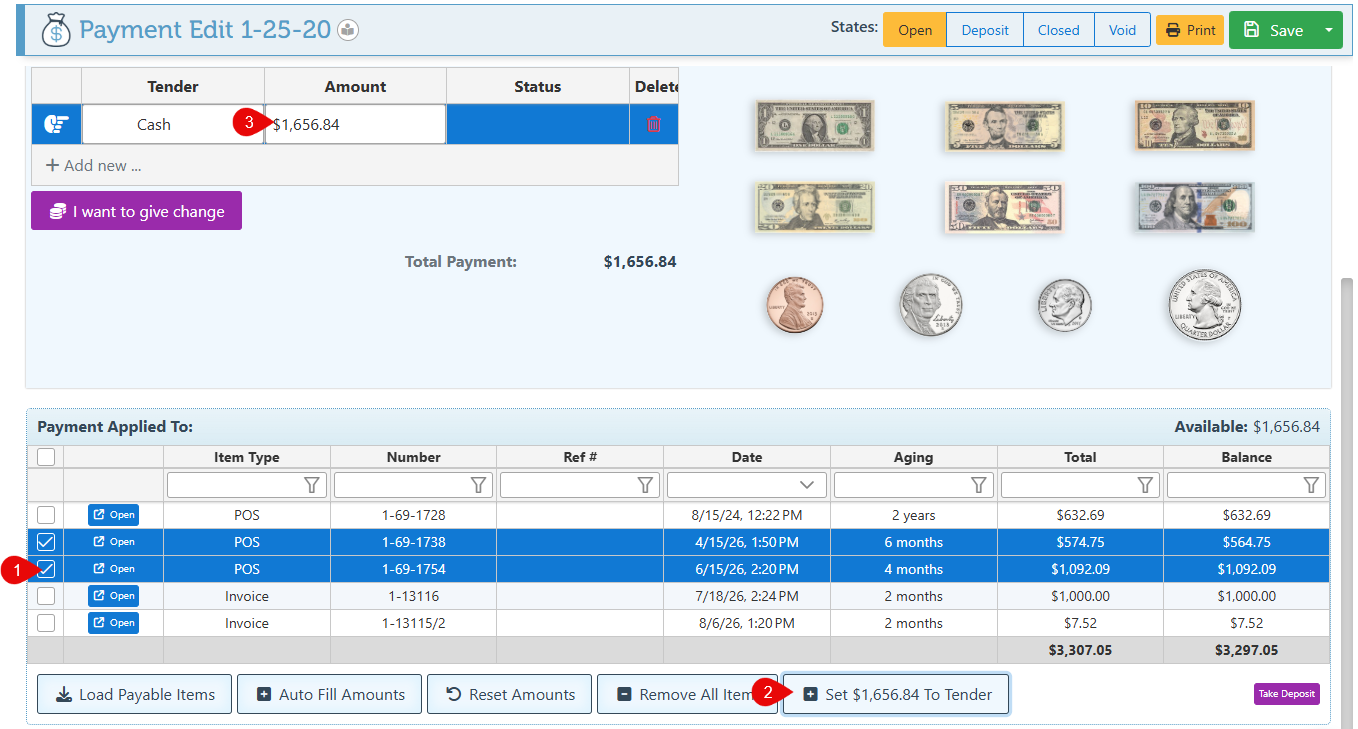
Select Invoices And Pay Accordingly
This method is useful to make payment based on the total of selected invoices. Instead of entering a payment amount first, relevant transactions can be selected and the system will calculate their combined balance.
Use the checkboxes located on the left side of the transaction rows to select the invoices to be paid. A button displaying the total balance of the selected transactions will appear and can then be used set the calculated total to the payment tender.

-
Advanced new set of features to support returns to be made and linked to Purchase Orders and Invoices.
-
Price rules can now apply discounts based on the sale total and the age of a customer’s account balance.
-
New Back Office transaction button to set a selected entry as a return.
-
Improved payment batch page now features an email/ print icon depending on whether an email address is saved on account.
-
Improved error message on the payment screen to show when processing response was blocked by the filter, that the card may have been charged, and to ensure that the system URLs are whitelisted.
-
Advanced the PDF Import Widget to recognize, support, and import pivot items.

-
Set up an additional POS receipt layout to enable customer receipts to appear in invoice layout.
-
Use the “Take Additional Payment” button at the bottom right of the payment page, to take more than one payment or to use a specific tender multiple times.
-
Add the “Pay online” link to the layout of emailed receipts to enable customers to make payments online.

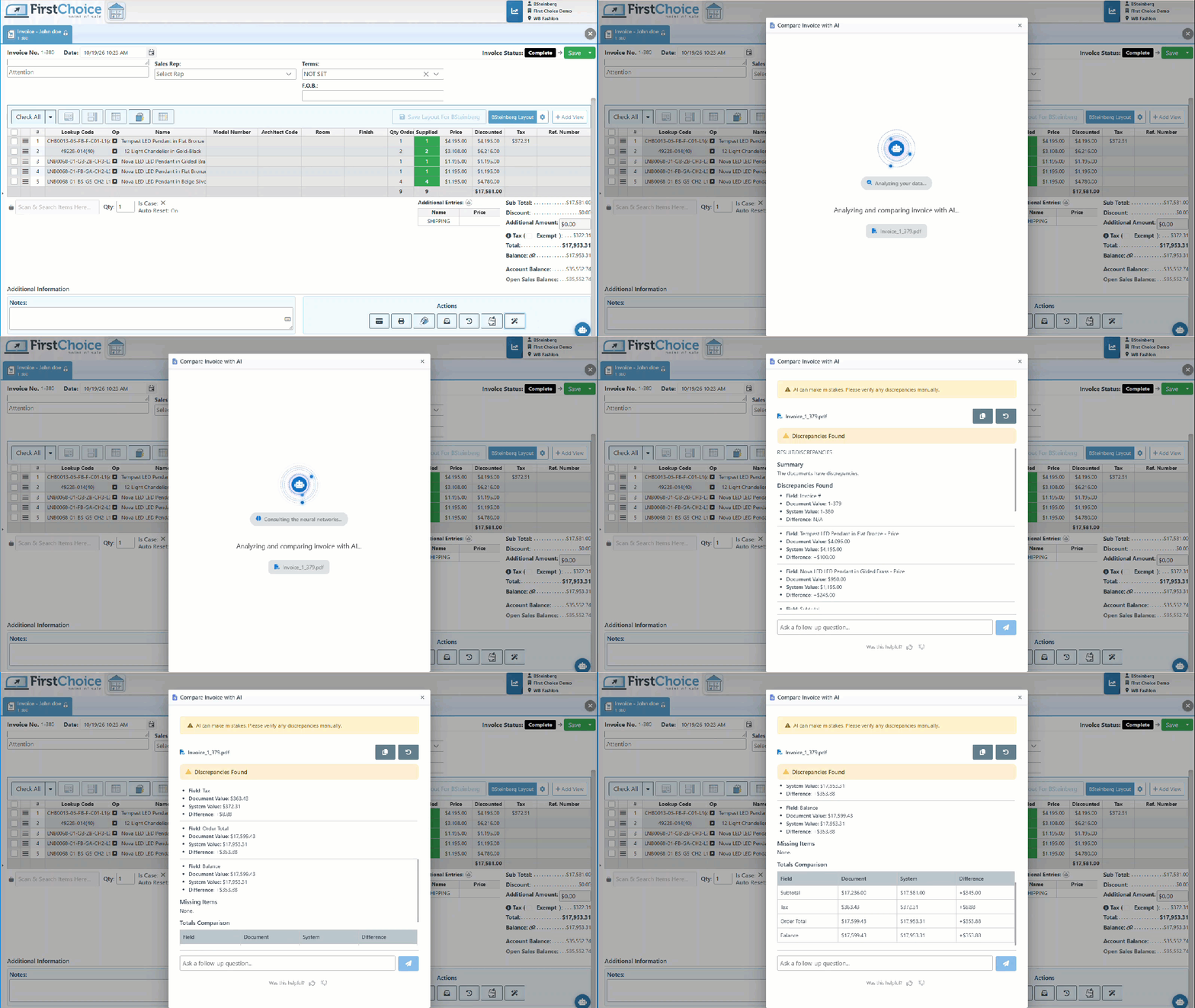
Introducing Compare Transactions AI, a new feature that uses AI to compare selected transactions and automatically identify differences in items, quantities, and prices. It generates a clear, concise summary of the results, highlighting discrepancies, missing entries, and changes between transactions. This streamlines transaction reviews, helps verify accuracy, and reduces the time and effort required for manual comparisons.

-
Consumers are more likely to pay with cash when they feel guilty or self-conscious about a purchase (such as fast food, alcohol, or luxury items). Cash leaves no paper or electronic trail, helping them mentally erase or forget the transaction, according to US Chamber Studies.
-
As proven by The national Institute Of Health, Handing over physical bills is a tangible, visible reminder of loss. It activates the strongest pain of paying, and acts as a natural brake on overspending,
-
Services like Buy Now, Pay Later (Klarna, Afterpay) bypass the pain of paying by slicing a total cost into smaller, bite-sized installments. This framing tricks the brain into viewing expensive items as cheap, driving impulse buying. As proven by the American Psychological Association.
What’s New
Explore our "What’s New" page to discover the latest advancements and updates. We regularly share our newest developments, innovations, and features to keep you informed and engaged
See our Help Page for comprehensive guides and illustrations that detail both basic and advanced features of the system.
Ensure that your system is updated to the latest version by closing and restarting the POS program. A notification pop-up will appear, prompting you to update to the most recent version. This will enable access to and installation of the latest feature updates for your system.
Note: The POS system is highly customizable. If your system does not show the features mentioned here, contact your First Choice agent to set it up.
Our expert support team is standing by to assist you, via phone or Email, with any questions that may arise.
Contact us at 718-522-0909 or email info@firstchoicepos.com.
Happy with the service? Give us a thumbs-up.
Write a quick and easy GOOGLE REVIEW to let others know why First Choice is the best choice for a retail business.