
"Seasonal Enhancements: How Key System Updates Are Redefining Our Efficiency"
In alignment with our ongoing commitment to transparency and excellence, we are pleased to introduce the launch of monthly updates to keep you informed of our progress and ensure our success marks yours.
The updates provide key insights into the latest developments, enhancements, and features within our Point-of-Sale (POS) system. They are intended to keep you engaged in our journey and ensure that the milestones we achieve reflect and enhance your success. We believe that our achievements are most significant when they contribute to yours.
We are excited about the potential these updates offer and the new heights we can reach together. Thank you for your trust in us. We look forward to another month of mutual progress and collaboration.
Self Checkout
Introducing our self-checkout POS system—designed to streamline your operations, reduce wait times, and enhance the customer experience. With an intuitive touchscreen interface, seamless integration with the existing pos, and built-in security, this system is perfect for modern retail environments. Whether you're managing a grocery store, boutique, or convenience shop, our self-checkout solution empowers customers to shop and pay with ease, boosting satisfaction while optimizing efficiency.
Self-checkout Feature Release: What's Included
Add Items
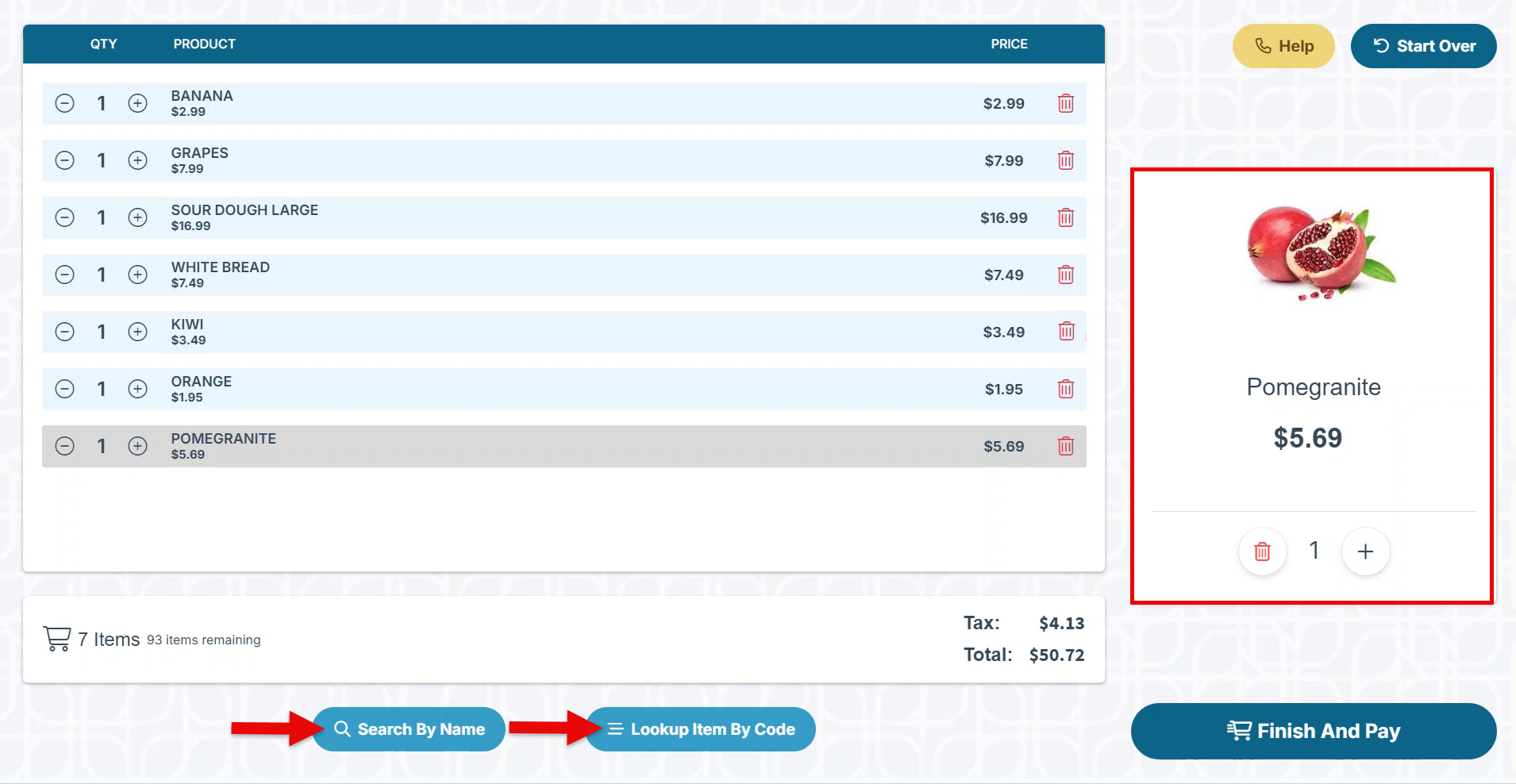
Items can be added to the order by scanning or searching using the code, name, or category. An enlarged image and item description will appear on the right side of the screen to enhance the shopping experience.
Add Items By Category
On the self-checkout screen, click “Search By Name” to add items by category.
-
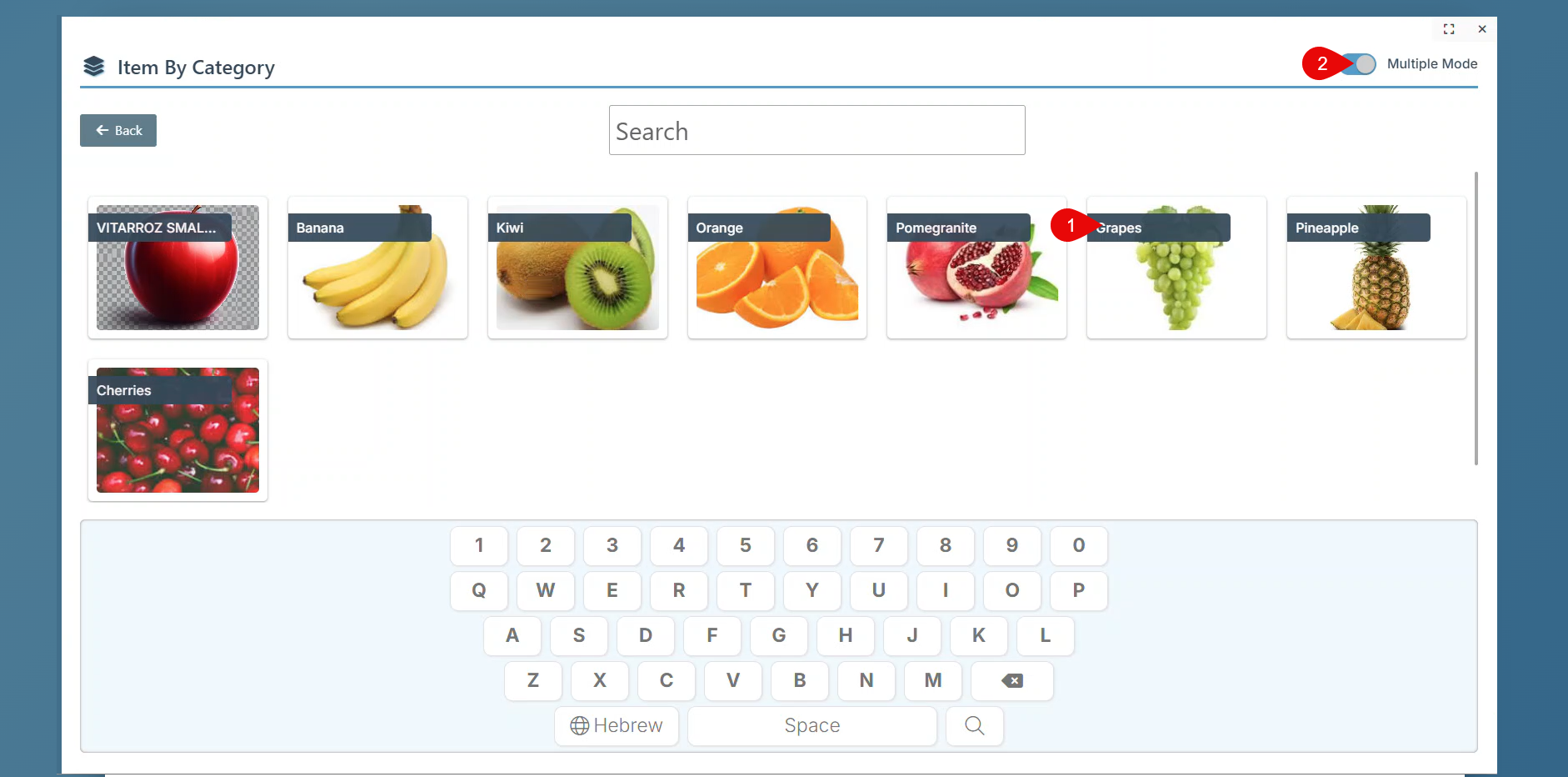
Select a specific Category to view items from within the category.
-
Enable “Multiple Mode” to select multiple items from a category without closing the category pop-up.
Manager Configurations
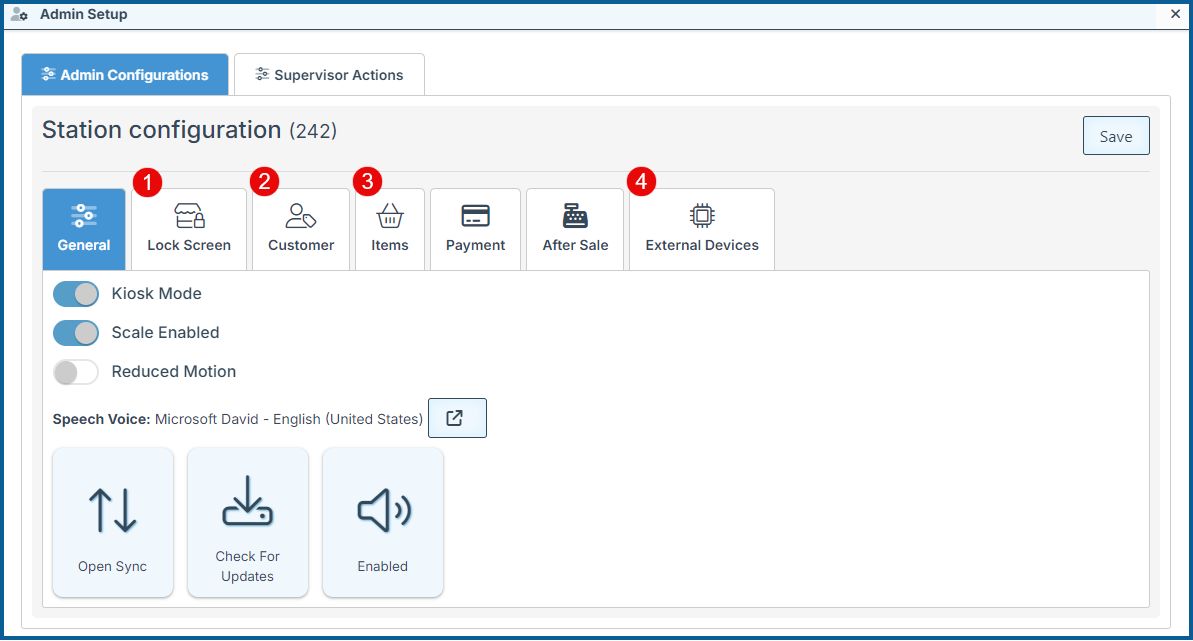
Scan the Manager barcode at any time to conveniently access the Manager's Configurations menu.
-
Select Idle time till screen lock.
-
Set customer sign-in to be required or optional
-
Set categories to load, enabling item selection by category.
-
Configure station printers, including multiple printers for production and customer use.
Additionally, use the Manager Configurations to easily manage many more station configurations.
Additional Great General Features
-
Add detailed and exciting AI-generated item icons to receipts to enhance the visual clarity and interest. (Currently available for the supermarket industry only.)
-
Select your preferred self-checkout Instructor’s voice.
-
Enter a Discount description in the new Note field on the Manager Approval Discount pop-up.
-
Add the customer name and number to the shipping label layout to facilitate better communication for delivery.
-
Use Production printers to print self-checkout receipts at a different or multiple locations.
-
Check out securely and accurately with the notification pop-up if a sale is started while the scale weight is not cleared to zero.
System Tips- In Case You Missed It
-
Type a number followed by the * key to set a quantity for the item you are currently scanning.
-
Press the + key in any tender field to automatically enter the transaction total.
-
To use several credit cards for a single transaction, enter the card information and press the Enter key.
The Numbers Behind The Industry
According to the Capital One Shopping Study, 48% of American consumers use self-checkout all or most of the time.
In the past year, over 10,000 retailers worldwide have installed self-checkout systems.
77% of worldwide shoppers prefer self-checkout, according to the NCR Voyix survey.
Self-checkout can reduce checkout time by up to 30% compared to traditional cashiers.
What’s New
Explore our "What’s New" page to discover the latest advancements and updates. We regularly share our newest developments, innovations, and features to keep you informed and engaged.
Ensure that your system is updated to the latest version by closing and restarting the POS program. A notification pop-up will appear, prompting you to update to the most recent version. This will enable access to and installation of the latest feature updates for your system.
Note: The POS system is highly customizable. If your system does not show the features mentioned here, contact your First Choice agent to set it up.
Our expert support team is standing by to assist you, via phone or Email, with any questions that may arise.
Contact us at 718-522-0909 or email info@firstchoicepos.com.
Happy with the service? Give us a thumbs-up.
Write a quick and easy GOOGLE REVIEW to let others know why First Choice is the best choice for a retail business.