
-20251222-144212.png?cb=a613565412b3ce38b932d6a8815dcc30)
Discover what’s new this January
We are excited to share our January updates, featuring system updates, tips, and seasonal highlights.
We are enthusiastic about the potential these updates offer and the new heights we can reach together. Thank you for your trust in us. We look forward to another month of mutual progress and collaboration.
QuickBooks Integration
The QuickBooks - First Choice Integration provides a powerful solution for seamless synchronization of sales and bills. This advances the synchronization process, increasing efficiency and minimizing errors. Key components of the integration include: recording end-of-day totals as QuickBooks sales receipts, converting purchase order totals into QuickBooks vendor bills, and managing supplier information.
QuickBooks Desktop Integration: What's Included
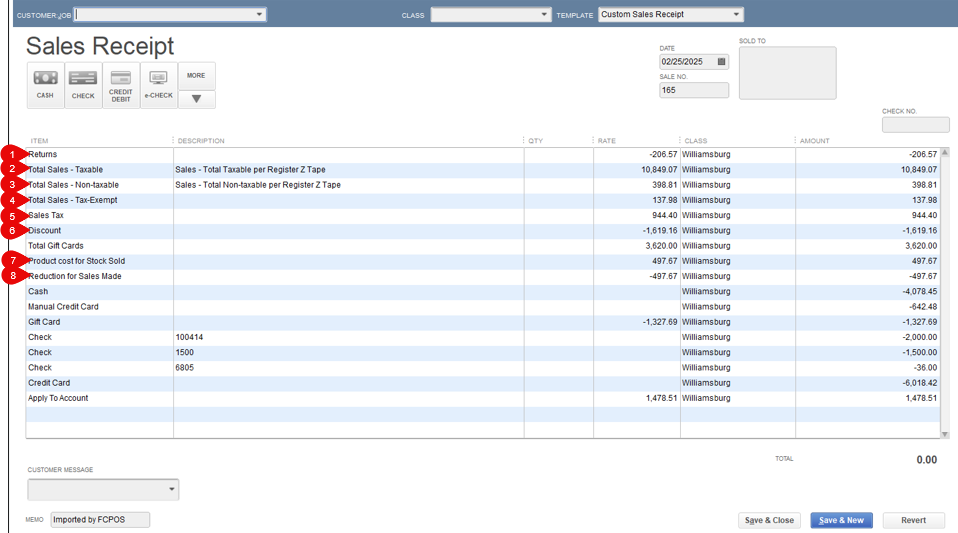
The QuickBooks/ First Choice End of Day Sync is an advanced feature enabling users to import a sales receipt summarizing the totals for sales made throughout the day. The receipt includes the following entries:
-
Returns (Total credit given for returns.)
-
Total Sales - Taxable
-
Total Sales - Non-taxable
-
Total Sales- Tax Exempt
-
Sales Tax (Total amount of tax collected for sales.)
-
Discount (Total amount given in discounts.)
-
Cost of Goods Sold (Amount to be added to the Cost of Goods Sold account to properly reflect profit margins of sales.)
-
Reduction for Sales Made (Amount to be deducted from total inventory assets.)
-
Additionally, the receipt contains line entries detailing the total income from each tender type, such as cash, card, EBT, etc.
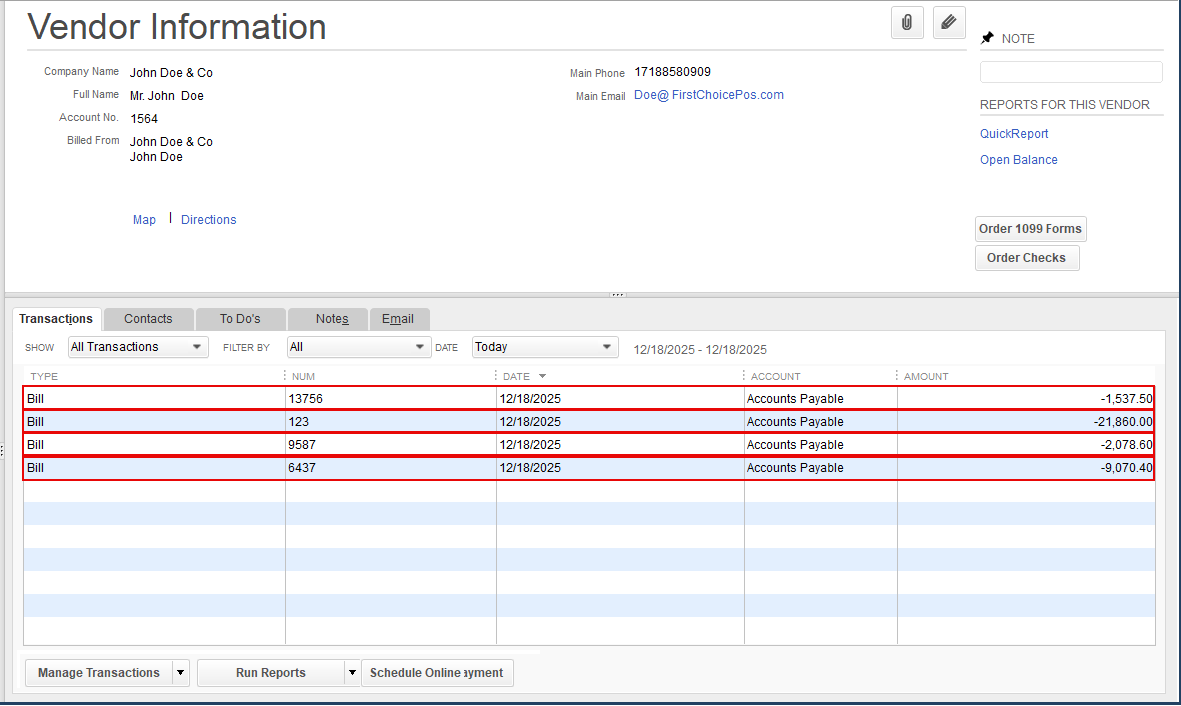
The QuickBooks/ First Choice Bills Sync retrieves purchase orders from First Choice and generates corresponding vendor bills in QuickBooks Desktop. For each vendor, the sync generates a bill under that vendor visible in the vendor’s center. Each bill contains one line per purchase order, showing the PO reference number and the total amount of the purchase order.
Sync According to Specific Dates
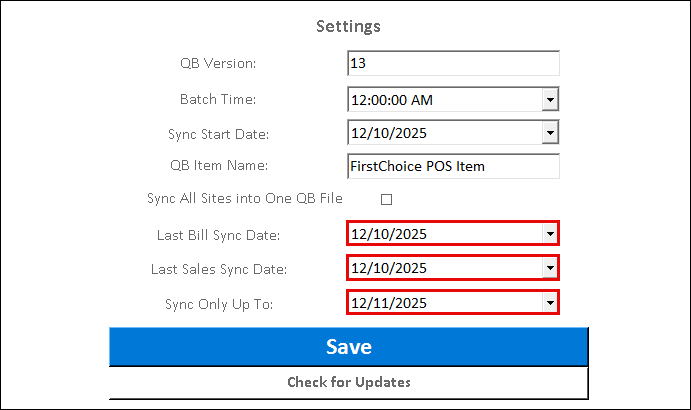
Advanced sync settings enable the selection of a start and end date to synchronize sales or bills for a specific time period.
First Choice- Quickbooks Vendors
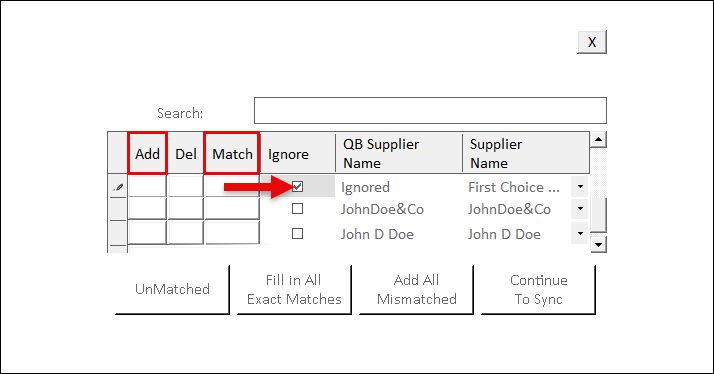
Vendor settings on the integration sync tool enable the addition of First Choice suppliers that have not yet been saved in QuickBooks, as well as the mapping of suppliers with different names in the First Choice and QuickBooks systems. Additionally, the feature provides the option to disregard specific suppliers within QuickBooks.
When syncing purchase orders for new vendors, a pop-up listing all unmatched suppliers will appear, prompting to add them as new entries or match to existing suppliers.
Additional Great General Features
-
New option to add expiration date on items (And item labels).
-
DataCap device improvements now enable the display of the transaction entries and the total.
-
Introducing the Bartender Integration, enabling advanced label design and layout.
-
New additional column in the Bulk Edit Items report enables the return policy to be set for multiple items simultaneously.
-
Advanced Price Rule feature enables discounts to be applied based on specific quantities.
System Tips- In Case You Missed It
-
Click and drag the icon of any page to the page header of the Main Navigation dashboard to create a shortcut.
-
To access the Help page and view tutorials and instructional guides on various system features and pages, click the Booklet button on the footer ribbon.
-
To open a specific entry of any report in a new tab, click it using the mouse scroll wheel.
-
When navigating through multiple backend tabs, click the magnifying glass icon at the top right to access them in a dropdown menu for easier navigation.
The Numbers Behind The Industry
-
According to BusinessDasher, over 29 million businesses in the US use QuickBooks.
-
In October 2023, as Advanced POS systems began integrating with QuickBooks, the company discontinued its own backdated POS system.
-
A survey by Accounting Today found that 82% of business owners who integrated with accounting systems reported a significant decrease in errors in their financial reporting.
-
According to the National Retail Federation, businesses that integrated with QuickBooks reduce accounting errors by up to 30% and improve overall efficiency by 20%.
What’s New
Explore our "What’s New" page to discover the latest advancements and updates. We regularly share our newest developments, innovations, and features to keep you informed and engaged.
Ensure that your system is updated to the latest version by closing and restarting the POS program. A notification pop-up will appear, prompting you to update to the most recent version. This will enable access to and installation of the latest feature updates for your system.
Note: The POS system is highly customizable. If your system does not show the features mentioned here, contact your First Choice agent to set it up.
Our expert support team is standing by to assist you, via phone or Email, with any questions that may arise.
Contact us at 718-522-0909 or email info@firstchoicepos.com.
Happy with the service? Give us a thumbs-up.
Write a quick and easy GOOGLE REVIEW to let others know why First Choice is the best choice for a retail business.